Converting LED solar powered garden lights for a doll’s house

I bought a solar panel from China and three solar-powered garden lights for $0.85 USD each.  I opened up the garden lights, and inside was a really simple circuit with a single chip to boost the voltage from the 1.2V battery to the 3V needed for the LED, and an inductor to control the amount of current that it supplies:

One of the garden lights wasn’t working, so that left me with two.  I cut off the small solar panels from the two remaining garden light circuit boards, and connected them in parallel to the larger solar panel that I’d bought.   I cut off the LED and inductor from the broken board, and soldered them in parallel to a working board’s LED and inductor, respectively.  For the upstairs LED, I actually cut off the white LED and used a yellow LED, just to make it seem more cozy like a bedroom.

I wired it all up, and hot glued everything into place.

The inductance controls the current supplied by the YX8018 booster to the LED, and from its spec sheet, an inductance of 220uH gives us 7 mA to the LED.  By putting two in parallel, we get a total inductance of 1/(2/220uH) = 220uH/2 = 110uH.  Which from the spec sheet gives us 10mA.  Which is good enough.

So in total, we draw 3V x 10mA = 0.03 watts for the LEDs.  Perhaps round that up to 0.05 to include the booster circuit.  So drawing 25mA from the 1.2V cells.

And so, the result is three LEDs which light up when it’s dark, and stays lit for several hours (2 days if the cells actually hold 2*600mAh like they say on them, but I don’t believe that value in the slightest).


Biped Robot

I’ve always wanted to make a walking robot.  I wanted to make something fairly rapidly and cheaply that I could try to get walking.

And so, 24 hours of hardware and software hacking later:

8jiqqy

He’s waving only by a short amount because otherwise he falls over 🙂  Took a day and half to do, so overall I’m pretty pleased with it.  It uses 17 MG996R servos, and a Chinese rtrobot 32 servo controller board.

Reverse Engineering Servo board

The controller board amazingly provides INCOMPLETE instructions.  The result is that anyone trying to use this board will find that it just does not work because the board completely ignores the commands that are supposed to work.

I downloaded the example software that they provide, which does work.  I ran the software through strace like:

$ strace  ./ServoController 2>&1 | tee dump.txt

Searching in dump.txt for ttyACM0 reveals the hidden initialization protocol.  They do:

open("/dev/ttyACM0", O_RDWR|O_NOCTTY|O_NONBLOCK) = 9
write(9, "~RT", 3)                      = 3
read(9, "RT", 2)                        = 2
read(9, "\27", 1)                       = 1
ioctl(9, TCSBRK, 1)                     = 0
write(9, "~OL", 3)                      = 3
write(9, "#1P1539\r\n", 9)              = 9

(The TCSBRK  ioctl basically just blocks until nothing is left to be sent).  Translating this into python we get:


#!/usr/bin/python
import serial
from time import sleep

ser = serial.Serial('/dev/ttyACM0', 9600)
ser.write('~RT')
print(repr(ser.read(3)))
ser.write('~OL')
ser.flush()
ser.write("#1P2000\r\n")  # move motor 1 to 2000
sleep(1)
ser.write("#1P1000\r\n")  # move motor 1 to 1000
print("done")

(Looking at the strace more, running it over multiple runs, sometimes it writes “~OL” and sometimes “OL”.  I don’t know why.  But it didn’t seem to make a difference.  That’s the capital letter O btw.)

Feedback

I wanted to have a crude sensor measurement of which way up it is.  After all, how can it stand up if it doesn’t know where up is?  On other projects, I’ve used an accelerometer+gyro+magnetometer, and fused the data with a kalman filter or similar.  But honestly it’s a huge amount of work to get right, especially if you want to calibrate them (the magnetometer in particular).  So I wanted to skip all that.

Two possible ideas:

  1. There’s a really quick hack that I’ve used before – simply place the robot underneath a ceiling light, and use a photosensitive diode to detect the light (See my Self Balancing Robot).  Thus its resistance is at its lowest when it’s upright 🙂   (More specifically, make a voltage divider with it and then measure the voltage with an Arduino).  It’s extremely crude, but the nice thing about it is that it’s dead cheap, and insensitive to vibrational noise, and surprisingly sensitive still.  It’s also as fast as your ADC.
  2. Use an Android phone.

I want to move quickly on this project, so I decided to give the second way a go.  Before dealing with vibration etc, I first wanted to know whether it could work, and what the latency would be if I just transmitted the Android fused orientation data across wifi (UDP) to my router, then to my laptop, which then talks via USB to the serial board which then finally moves the servo.

So, I transmitted the data and used the phone tilt to control the two of the servos on the arm, then recorded with the same phone’s camera at the same time.   The result is:

I used a video editor (OpenShot) to load up the video, then measured the time between when the camera moved and when the arm moved.  I took 6 such measurements, and found 6 or 7 frames each time – so between 200ms and 233ms.

That is..  exactly what TowerKing says is the latency of the servo itself (Under 0.2s).  Which means that I’m unable to measure any latency due to the network setup.  That’s really promising!

I do wonder if 200ms is going to be low enough latency though (more expensive hobby servos go down to 100ms), but it should be enough.  I did previously do quite extensive experimental tests on latency on the stabilization of a PID controlled quadcopter in my own simulator, where 200ms delay was found to be controllable, but not ideal.  50ms was far more ideal.  But I have no idea how that lesson will transfer to robot stabilization.

But it is good enough for this quick and dirty project.  This was done in about 0.5 days, bringing the total so far up to 2 full days of work.

Cost and Time Breakdown so far

Metal skeleton $99 USD
17x MG996R servo motors $49 USD
RT Robot 32ch Servo control board $25 USD
Delivery from China $40 USD
USB Cable $2 USD
Android Phone (used own phone)
Total: $215 USD
Parts cost:

For tools, I used nothing more than some screwdrivers and needle-nosed pliers, and a bench power supply. Around $120 in total. I could have gotten 17x MG995 servos for a total of $45, but I wanted the metal gears that the MG996R provide.

Time breakdown:
Mechanical build 1 day
Reverse engineering servo board 0.5 days
Hooking up to Android phone + writing some visualization code 0.5 days
Blogging about it 🙂 0.5 days
Total: 2.5 days

Future Plans – Q Learning

My plan is to hang him loosely upright by a piece of string, and then make a neural network in tensor flow to control him to try to get him to stand full upright, but not having to deal with recovering from a collapsed lying-down position.

Specifically, I want to get him to balance upright using Q learning.  One thing I’m worried about is the sheer amount of time required to physically do each tests.  When you have a scenario where each test takes a long time compared to the compute power, this just screams out for Bayesian learning.   So…  Bayesian Q-parameter estimation?  Is there such a thing?  A 10 second google search doesn’t find anything.  Or Bayesian policy network tuning?    I need to have a think about it 🙂

Coursera Neural Networks for Machine Learning

I’ve completed another 4 month Coursera Machine Learning course. The first was the Andrew NG’s Machine Learning course, and the second is Geoffrey Hinton’s Neural Networks for Machine Learning course.  I also completed a 2 month Coursera course in Computation Neuroscience.

coursera.png

Course certificate

Both courses use Matlab, and this second one was significantly more work and buggier. Several of the exam questions had key bits of information accidentally left out and referred to images that didn’t exist. Only by referring to the user forums could the key bits of information be found out. However I was one of the first people to do this course, so bugs are to be expected.

Technical issues aside, I enjoyed the course a lot. It’s approximately 5 years behind the current state of the field, but the information is still very relevant.

Edit: Update on 2017/2/5 – I also did the 2 month Computational Neuroscience course:

coursera

I enjoyed the first half of the course, which was all new and interesting to me.  But the second half was just a basic version of the Andrew Ng course.


React + Twine

Twine is a neat ‘open-source tool for telling interactive, nonlinear stories’, as its blurb says.  It lets you write stories using variables, conditionals, and other simple programming primitives.  It supports three different languages, but I’ll focus only on the default, Harlowe.  Some example code:

Hello $name. (if: $isMale)[You're male!](else:)[You're female!].

This works pretty well, but it can be really cumbersome to do anything complicated.  I was curious to see how well it could be integrated into React.  Harlowe purposefully does not expose any of its internals, so our solution is going to need to be pretty hacky.

The solution that I came up with was to add some javascript to a startup tag that Harlowe will run, and attach the necessary private variable to the global window variable.  Then to load and run the Harlowe engine in the react componentWillMount function.  Like so:

import React, { Component } from 'react';
import './App.css';

class App extends Component {
  componentWillMount() {
    const script = document.createElement("script");
    script.src = "harlowe-min.js";
    script.async = true;
    document.body.appendChild(script);
  }

  render() {
    return (
<div className="App">
        <header id="header">My header

</header>
<div id="container">
          <main id="center" className="column">
            <article>
              <tw-story dangerouslySetInnerHTML={{__html: ""}}></tw-story>
              <tw-storydata startnode={1} style={{display:"none"}}>
                <script role="script" id="twine-user-script" type="text/twine-javascript">{`
                  if (!window.harlowe){ window.harlowe = State; }
                `}</script>
                <tw-passagedata pid={1} name="Start">**Success!**(set: $foo to 1) Foo is $foo</tw-passagedata>
              </tw-storydata>
            </article>
          </main>

          <nav id="left" className="column">
<h3>Left heading</h3>
<ul>
	<li><a href="#">Some Link</a></li>
</ul>
</nav>
<div id="right" className="column">
<h3>Right heading</h3>
</div>
</div>
<div id="footer-wrapper">
          <footer id="footer">&nbsp;

</footer></div>
</div>
);
  }
}

export default App;

It seemed to work just fine without

dangerouslySetInnerHTML={{__html: ""}}

But I added it to make it clear to react that we don’t want react to manage this.

Unfortunately I couldn’t proceed further than this with trying to make them nicely integrate. I couldn’t see a way to hook into the engine to know when a variable is updated via, say, a user clicking on a (link:..)[].

There is a VarRef object that would allow exactly this with jQuery, by doing something like:

var setState = this.setState.bind(this);
VarRef.on('set', (obj, name, value) => {
  if (obj === State.variables) {
    setState({[name]: value})
  }
})

Unfortunately the VarRef is not exposed in any scope that I can find. The source code is available, so the VarRef can be exposed with a fairly simple change, but not without doing that, as far I can tell.

Changing the color of image in HTML with an SVG feColorMatrix filter

In a previous post, I changed the color of a simple image (of a pair of eyes) by converting it to an SVG first, and then changing the SVG colors.

But what if you want to a take a complex image and change the color?


In Photoshop/Gimp this can be achieved by creating a new layer on top of the image and filling it with a solid color, and then setting its Mode to ‘Multiply’.  But how can we reproduce this on the web?

There are various solutions using svg filters (feFlood and feBlend) but these are not very well supported in browsers.  So I’ve come up with a solution that is very well supported in all modern browsers, including IE.


...


Replace the numbers 0.5 with the rgb values of the color that you want.  For example, in react:


hexToRgb(hex) {
var result = /^#?([a-f\d]{2})([a-f\d]{2})([a-f\d]{2})$/i.exec(hex);
return result ? {
r: parseInt(result[1], 16),
g: parseInt(result[2], 16),
b: parseInt(result[3], 16)
} : {r: 255, g: 255, b: 255};
}

skinColorDef(colorAsString) {
const hex = hexToRgb(colorAsString); /* <-- See next for an improvement*/
const r = hex.r/255;
const g = hex.g/255;
const b = hex.b/255;
return (


);
}


We can now tint our image with a color like skinColorDef(“#e7b48f”).

But let’s make small improvement.  It’s not obvious what the final color is going to be because the tint color is multiplied by the color in the image.  So let’s make it more intuitive by first looking at the main color in the image (e.g. using the color picker in gimp/photoshop) and then dividing (i.e ‘un-multiplying’) the colorAsString by that color.

For example, the skin color in that girl image is #fff2f2 which is (255,242,228).  So:


divideByImageSkinColor(rgb) {
return {r: rgb.r * (255/255), g: rgb.g * (255/242), b: rgb.b * (255/242)}
}

and modify the skinColorDef like:


skinColorDef(colorAsString) {
const hex = divideByImageSkinColor(hexToRgb(colorAsString));

Now we can just chose the colors directly.  For skin, the Fitzpatrick Scale is a nice place to start:

fitzpatrick-color-chart

We can now use these RGB values directly in our skinColorDef function.  Here’s an example html combobox to select the color: (The onChange function is left to you to implement)


Light
Fair
Medium
Olive
Brown
Black


And that’s it!

Sidenote: Many years ago, I wrote the graphics drivers (when I worked at Imagination Technologies) to accelerate this sort of multiply operation using shaders.  That driver is used in the iPhone, iPad, TomTom, and many other small devices.

Photoshop/gimp layers to SVG

Ever wanted to export multiple layers in a Gimp or Photoshop image, with each layer as its own PNG, but the whole thing then wrapped up as an SVG?

The usefulness is that an artist can create an image of, say, a person, with eyes of various different colours in multiple layers.  Then we can create an SVG file that we can embed in an html page, and then change the color of the eyes through Javascript.

So take this example.  In this image we have a face made up of various layers, and the layers are further grouped in GroupLayers.

So imagine having this image, then in Javascript on your page being able to swap out just the eye image.  Or just the mouth image.

To achieve this, I had to modify an existing gimp python script from 5 years ago that has since bitrotted.  Back when it was written, there was no such thing as group layers, so the script doesn’t work now.  A bit of hacking, and I get:

#!/usr/bin/env python
# -*- coding: <utf-8> -*-
# Author: Erdem Guven <zuencap@yahoo.com>
# Copyright 2016 John Tapsell
# Copyright 2010 Erdem Guven
# Copyright 2009 Chris Mohler
# "Only Visible" and filename formatting introduced by mh
# License: GPL v3+
# Version 0.2
# GIMP plugin to export as SVG

# Save this to ~/.gimp-*/plug-ins/export_svg.py

from gimpfu import *
import os, re

gettext.install("gimp20-python", gimp.locale_directory, unicode=True)

def format_filename(imagename, layer):
	layername = layer.name.decode('utf-8')
	regex = re.compile("[^-\w]", re.UNICODE)
	filename = imagename + '-' + regex.sub('_', layername) + '.png'
	return filename

def export_layers(dupe, layers, imagename, path, only_visible, inkscape_layers):
	images = ""
	for layer in layers:
		if not only_visible or layer.visible:
			style=""
			if layer.opacity != 100.0:
				style="opacity:"+str(layer.opacity/100.0)+";"
			if not layer.visible:
				style+="display:none"
			if style != "":
				style = 'style="'+style+'"'

			if hasattr(layer,"layers"):
				image = '<g inkscape:groupmode="layer" inkscape:label="%s" %s>' % (layer.name.decode('utf-8'),style)
				image += export_layers(dupe, layer.layers, imagename, path, only_visible, inkscape_layers)
				image += '</g>'
				images = image + images
			else:
				filename = format_filename(imagename, layer)
				fullpath = os.path.join(path, filename);
				pdb.file_png_save_defaults(dupe, layer, fullpath, filename)

				image = ""
				if inkscape_layers:
					image = '<g inkscape:groupmode="layer" inkscape:label="%s" %s>' % (layer.name.decode('utf-8'),style)
					style = ""
				image += ('<image xlink:href="%s" x="%d" y="%d" width="%d" height="%d" %s/>\n' %
					(filename,layer.offsets[0],layer.offsets[1],layer.width,layer.height,style))
				if inkscape_layers:
					image += '</g>'
				images = image + images
		dupe.remove_layer(layer)
	return images

def export_as_svg(img, drw, imagename, path, only_visible=False, inkscape_layers=True):
	dupe = img.duplicate()

	images = export_layers(dupe, dupe.layers, imagename, path, only_visible, inkscape_layers)

	svgpath = os.path.join(path, imagename+".svg");
	svgfile = open(svgpath, "w")
	svgfile.write("""<?xml version="1.0" encoding="UTF-8" standalone="no"?>
<!-- Generator: GIMP export as svg plugin -->

<svg xmlns:xlink="http://www.w3.org/1999/xlink" """) 	if inkscape_layers: 		svgfile.write('xmlns:inkscape="http://www.inkscape.org/namespaces/inkscape" ') 	svgfile.write('width="%d" height="%d">' % (img.width, img.height));
	svgfile.write(images);
	svgfile.write("</svg>");

register(
	proc_name=("python-fu-export-as-svg"),
	blurb=("Export as SVG"),
	help=("Export an svg file and an individual PNG file per layer."),
	author=("Erdem Guven <zuencap@yahoo.com>"),
	copyright=("Erdem Guven"),
	date=("2016"),
	label=("Export as SVG"),
	imagetypes=("*"),
	params=[
		(PF_IMAGE, "img", "Image", None),
		(PF_DRAWABLE, "drw", "Drawable", None),
		(PF_STRING, "imagename", "File prefix for images", "img"),
		(PF_DIRNAME, "path", "Save PNGs here", os.getcwd()),
		(PF_BOOL, "only_visible", "Only Visible Layers?", False),
		(PF_BOOL, "inkscape_layers", "Create Inkscape Layers?", True),
		   ],
	results=[],
	function=(export_as_svg),
	menu=("<Image>/File"),
	domain=("gimp20-python", gimp.locale_directory)
	)

main()

(Note that if you get an error ‘cannot pickle GroupLayers’, this is a bug in gimp. It can be fixed by editing

    350: gimpshelf.shelf[key] = defaults

)

Which when run, produces:

girl-Layer12.png
girl-Layer9.png
girl-Layer11.png
girl-Layer14.png
girl.svg

(I later renamed the layers to something more sensible 🙂 )

The (abbreviated) svg file looks like:


<g inkscape:groupmode="layer" inkscape:label="Expression" >

<g inkscape:groupmode="layer" inkscape:label="Eyes" >

<g inkscape:groupmode="layer" inkscape:label="Layer10" ><image xlink:href="girl-Layer10.png" x="594" y="479" width="311" height="86" /></g>

<g inkscape:groupmode="layer" inkscape:label="Layer14" ><image xlink:href="girl-Layer14.png" x="664" y="470" width="176" height="22" /></g>

<g inkscape:groupmode="layer" inkscape:label="Layer11" ><image xlink:href="girl-Layer11.png" x="614" y="483" width="268" height="85" /></g>

<g inkscape:groupmode="layer" inkscape:label="Layer9" ><image xlink:href="girl-Layer9.png" x="578" y="474" width="339" height="96" /></g>

<g inkscape:groupmode="layer" inkscape:label="Layer12" ><image xlink:href="girl-Layer12.png" x="626" y="514" width="252" height="30" /></g>

</g>

</g>

We can now paste the contents of that SVG directly into our html file, add an id to the groups or image tag, and use CSS or Javascript to set the style to show and hide different layers as needed.

CSS Styling

This all works as-is, but I wanted to go a bit further.  I didn’t actually have different colors of the eyes.  I also wanted to be able to easily change the color.  I use the Inkscape’s Trace Bitmap to turn the layer with the eyes into a vector, like this:

girl-eyecolor

Unfortunately, WordPress.com won’t let me actually use SVG images, so this is a PNG of an SVG created from a PNG….

I used as few colors as possible in the SVG, resulting in just 4 colors used in 4 paths.  I manually edited the SVG, and moved the color style to its own tag, like so:


<defs>
<style type="text/css"><![CDATA[ #eyecolor_darkest { fill:#34435a; } #eyecolor_dark { fill:#5670a1; } #eyecolor_light { fill:#6c8abb; } #eyecolor_lightest { fill:#b4dae5; } ]]></style>

</defs>

<path id="eyecolor_darkest" ..../>

The result is that I now have an svg of a pair of eyes that can be colored through css.  For example, green:

girl-eyecolor_green

Which can now be used directly in the head svg in an html, and styled through normal css:

head_green

Colors

For the sake of completeness, I wanted to let the user change the colors, but not have to make them specify each color individually. I have 4 colors used for the eye, but they are obviously related. Looking at the blue colors in HSL space we get:

RGB:#34435a =  hsl(216, 27%, 28%)
RGB:#5670a1 =  hsl(219, 30%, 48%)
RGB:#6c8abb =  hsl(217, 37%, 58%)
RGB:#b4dae5 =  hsl(193, 49%, 80%)

Annoyingly, the lightest color has a different hue. I viewed this color in gimp, change the hue to 216, then tried to find the closest saturation and value that matched it. 216, 85%, 87% seemed the best fit.

So, armed with this, we now have a way to set the color of the eye with a single hue:

#eyecolor_darkest  =  hsl(hue, 27%, 28%)
#eyecolor_dark     =  hsl(hue, 30%, 48%)
#eyecolor_light    =  hsl(hue, 37%, 58%)
#eyecolor_lightest =  hsl(hue, 85%, 87%)

Or in code:

function setEyeColorHue(hue) {
    document.getElementById("eyecolor_darkest").style.fill = "hsl("+hue+", 27%, 28%)";
    document.getElementById("eyecolor_dark").style.fill = "hsl("+hue+", 30%, 48%)";
    document.getElementById("eyecolor_light").style.fill = "hsl("+hue+", 37%, 58%)";
    document.getElementById("eyecolor_lightest").style.fill = "hsl("+hue+", 85%, 87%)";
}
<label for="hue">Color:</label>
<input type="range" id="hue" min="0" value="216" max="359" step="1" oninput="setEyeColorHue(this.value)" onchange="setEyeColorHue(this.value)"/>

Tinting a more complex image

But what if the image is more complex, and you don’t want to convert it to an SVG?  E.g.

The solution is to apply a filter to multiply the layer by another color.

See my follow up post: Changing the color of image in HTML with an SVG feColorMatrix filter


Dilation Animation

There is a neat git repository that generates animations of various different settings. But unfortunately it didn’t show dilation – which is one of my favourite Convolutional Neural Network techniques.

Edit: My changes are now merged

So I added support.

And here’s what my patch generates:  The bottom layer is the input layer, the top is the output layer.

dilation

No stride, no padding, dilation of 2, kernel size of 3

The idea with dilation is that at each layer you double the dilation size.  That way your receptive field grows exponentially with each layer, allowing you to deal with large images without pooling and thus have pixel sharpness.

Second order back propagation

This is a random idea that I’ve been thinking about. A reader messaged me to say that this look similar to online l-bgfs. To my inexperienced eyes, I can’t see this myself, but I’m still somewhat a beginner.

photo

Yes, I chose a cat example simply so that I had an excuse to add cats to my blog.

Say we are training a neural network to take images of animals and classify the image as being an image of a cat or not a cat.

You would train the network to output, say, y_{cat} = 1 if the image is that of a cat.

To do so, we can gather some training data (images labelled by humans), and for each image we see what our network predicts (e.g. “I’m 40% sure it’s a cat”).  We compare that against what a human says (“I’m 100% sure it’s a cat”)  find the squared error (“We’re off by 0.6, so our squared error is 0.6^2”) and adjust each parameter, w_i, in the network so that it slightly decreases the error (\Delta w_i  = -\alpha \partial E/\partial w_i).  And then repeat.

It’s this adjustment of each parameter that I want to rethink.  The above procedure is Stochastic Gradient Descent (SGD) – we adjust w_i to reduce the error for our test set (I’m glossing over overfitting, minibatches, etc).

Key Idea

This means that we are also trying to look for a local minimum. i.e. that once trained, we want the property that if we varied any of the parameters w_i by a small amount then it should increase the expected squared error E

My idea is to encode this into the SGD update. To find a local minima for a particular test image we want:

\dfrac{\partial y_{cat}}{\partial w_i} = 0

\dfrac{\partial^2y_{cat}}{\partial w_i^2}  < 0 (or if it equals 0, we need to consider the third differential etc).

Let’s concentrate on just the first criteria for the moment. Since we’ve already used the letter E to mean the half squared error of y, we’ll use F to be the half squared error of \dfrac{\partial y_{cat}}{\partial w_i}.

So we want to minimize the half squared error F:

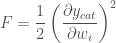
F = \dfrac{1}{2}\left(\dfrac{\partial y_{cat}}{\partial w_i}\right)^2

So to minimize we need the gradient of this error:

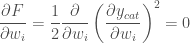
\dfrac{\partial F}{\partial w_i} = \dfrac{1}{2} \dfrac{\partial}{\partial w_i} \left(\dfrac{\partial y_{cat}}{\partial w_i}\right)^2 = 0

Applying the chain rule:

\dfrac{\partial F}{\partial w_i} = \dfrac{\partial y_{cat}}{\partial w_i} \dfrac{\partial^2 y_{cat}}{\partial w_i^2} = 0

SGD update rule

And so we can modify our SGD update rule to:

\Delta w_i = -\alpha \partial E/\partial w_i - \beta \dfrac{\partial y_{cat}}{\partial w_i} \dfrac{\partial^2 y_{cat}}{\partial w_i^2}

Where \alpha and \beta are learning rate hyperparameters.

Conclusion

We finished with a new SGD update rule. I have no idea if this actually will be any better, and the only way to find out is to actually test. This is left as an exercise for the reader 😀

Simple HTML

I frequently want a simple single-file html page that generates some text dynamically based on some inputs at the top of the page.  This can be done in react etc of course, but sometimes my usecase is so simple that it’s an overkill.

For example, to generate some template code based on a few input parameters. Or to make some calculations based on inputs, or to make a customizable story, etc.

With this in mind, I produced the following minimal HTML, using the handlebars processor, that lets me do exactly this:


<!DOCTYPE html>
<html>
<head>
	<meta charset="UTF-8">
    <title>Welcome</title>
    <script type="application/javascript" src="https://cdnjs.cloudflare.com/ajax/libs/handlebars.js/4.0.5/handlebars.min.js"></script>
    <script id="result-template" type="text/x-handlebars-template">
Hello {{name}}!  You are {{age}} years old.  {{#xif "this.age > 18"}} That's really old! {{else}} So young! {{/xif}}


Put the rest of your page here.
    </script>
</head>

<body>
<h2>What is your name?</h2>
Name: <input type="text" id="name" value="Bob"/>

        Age: <input type="number" id="age" value=32 min=0 ><p/><p/>
<div id="resultDiv"></div>
<script>
		var inputs = document.querySelectorAll("input");
		function update() {
			var params = {};
			for (i = 0; i < inputs.length; ++i) {
				params[inputs[i].id] = (inputs[i].type === "number")?Number(inputs[i].value):inputs[i].value;
			}
			document.querySelector("#resultDiv").innerHTML = template(params);
		}
		document.addEventListener("DOMContentLoaded", function() {
			Handlebars.registerHelper("xif", function (expression, options) {
   				 return Handlebars.helpers["x"].apply(this, [expression, options]) ? options.fn(this) : options.inverse(this);
			});
			Handlebars.registerHelper("x", function (expression, options) {
				try { return Function.apply(this, ["window", "return " + expression + " ;"]).call(this, window); } catch (e) { console.warn("{{x " + expression + "}} error: ", e); }
			});

			var source = document.querySelector("#result-template").innerHTML;
			template = Handlebars.compile(source);
			for (i = 0; i < inputs.length; ++i) {
				// Use 'input' to update as the user types, or 'change' on loss of focus
				inputs[i].addEventListener("input", update);
			}
			update();
		});
	</script>
</body>
</html>

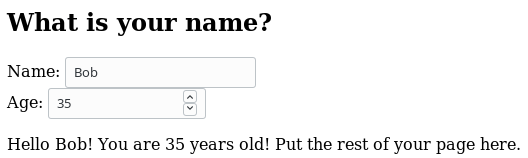
Which produces a result like:

html

Single-page HTML that changes the page on user input

Best-fitting to a Cumulative distribution function in python TensorFlow

I wanted to find a best fit curve for some data points when I know that the true curve that I’m predicting is a parameter free Cumulative Distribution Function.  I could just do a linear regression on the points, but the resulting function, y might not have the properties that we desire from a CDF, such as:

  • Monotonically increasing
  • y(x) \xrightarrow{x\to\infty} 1      i.e. That it tends to 1 as x approaches positive infinity
  • y(x) \xrightarrow{x\to-\infty} 0      i.e. That it tends to 0 as x approaches negative infinity

First, I take the second two points.  To deal with this, I use the sigmoid function to create a new parameter, x’:

x'(x) = \textrm{sigmoid}(x)

This has the nice property that x'(x) \xrightarrow{x\to\infty} 1 and x'(x) \xrightarrow{x\to-\infty} 0

So now we can find a best fit polynomial on x'.

So:

y(x') = a + bx' + cx'^2 + dx'^3 + .. + zx'^n

But with the boundary conditions that:

y(0) = 0 and y(1) = 1

Which, solving for the boundary conditions, gives us:

y(0) = 0 = a
b = (1-c-d-e-...-z)

Which simplifies our function to:

y(x') = (1-c-d-e-..-z)x' + cx'^2 + dx'^3 + ex'^4 .. + zx'^n

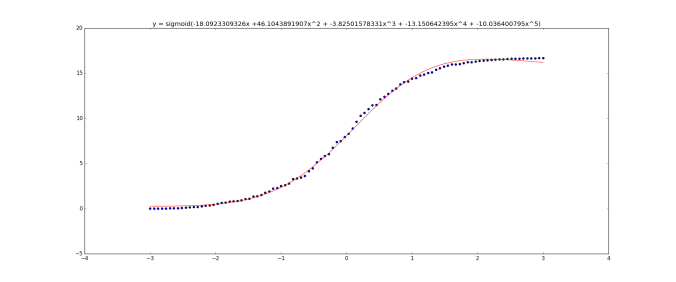
Implementing this in tensorflow using stochastic gradient descent (code is below) we get:

figure_1-2

20 data samples

figure_1-1

100 data samples

(The graph title equation is wrong.  It should be   x' = sigmoid(x) then y(x') = ax' +...  I was too lazy to update the graphs sorry)

Unfortunately this curve doesn’t have one main property that we’d like – it’s not monotonically increasing – it goes above 1. I thought about it for a few hours and couldn’t think of a nice solution.

I’m sure all of this has been solved properly before, but with a quick google I couldn’t find anything.

Edit: I’m updating this 12 days later. I have been thinking in the background about how to enforce that I want my function to be monotonic. (i.e. always increasing/decreasing) I was certain that I was just being stupid and that there was a simple answer. But by complete coincidence, I watched the youtube video Breakthroughs in Machine Learning – Google I/O 2016 in which the last speaker mentioned this restriction.  It turns out that this a very difficult problem – with the first solutions having a time complexity of O(N^4):

I didn’t understand what exactly google’s solution for this is, but they reference their paper on it:  Monotonic Calibrated Interpolated Look-up Tables, JMLR 2016.  It seems that I have some light reading to do!

#!/usr/bin/env python

import tensorflow as tf

import numpy as np
import tensorflow as tf
import matplotlib.pyplot as plt
from scipy.stats import norm

# Create some random data as a binned normal function
plt.ion()
n_observations = 20
fig, ax = plt.subplots(1, 1)
xs = np.linspace(-3, 3, n_observations)

ys = norm.pdf(xs) * (1 + np.random.uniform(-1, 1, n_observations))

ys = np.cumsum(ys)

ax.scatter(xs, ys)
fig.show()
plt.draw()

highest_order_polynomial = 3

# We have our data now, so on with the tensorflow
# Setup the model graph

# Our input is an arbitrary number of data points (That's what the 'None dimension means)
# and each input has just a single value which is a float

X = tf.placeholder(tf.float32, [None])
Y = tf.placeholder(tf.float32, [None])

# Now, we know data fits a CDF function, so we know that
# ys(-inf) = 0   and ys(+inf) = 1

# So let's set:

X2 = tf.sigmoid(X)

# So now X2 is between [0,1]

# Let's now fit a polynomial like:
#
#   Y = a + b*(X2) + c*(X2)^2 + d*(X2)^3 + .. + z(X2)^(highest_order_polynomial)
#
# to those points.  But we know that since it's a CDF:
#   Y(0) = 0 and y(1) = 1
#
# So solving for this:
#   Y(0) = 0 = a
#   b = (1-c-d-e-...-z)
#
# This simplifies our function to:
#
#   y = (1-c-d-e-..-z)x + cx^2 + dx^3 + ex^4 .. + zx^(highest_order_polynomial)
#
# i.e. we have highest_order_polynomial-2  number of weights
W = tf.Variable(tf.zeros([highest_order_polynomial-1]))

# Now set up our equation:
Y_pred = tf.Variable(0.0)
b = (1 - tf.reduce_sum(W))
Y_pred = tf.add(Y_pred, b * tf.sigmoid(X2))

for n in xrange(2, highest_order_polynomial+1):
    Y_pred = tf.add(Y_pred, tf.mul(tf.pow(X2, n), W[n-2]))

# Loss function measure the distance between our observations
# and predictions and average over them.
cost = tf.reduce_sum(tf.pow(Y_pred - Y, 2)) / (n_observations - 1)

# Regularization if we want it.  Only needed if we have a large value for the highest_order_polynomial and are worried about overfitting
# It's also not clear to me if regularization is going to be doing what we want here
#cost = tf.add(cost, regularization_value * (b + tf.reduce_sum(W)))

# Use stochastic gradient descent to optimize W
# using adaptive learning rate
optimizer = tf.train.AdagradOptimizer(100.0).minimize(cost)

n_epochs = 10000
with tf.Session() as sess:
    # Here we tell tensorflow that we want to initialize all
    # the variables in the graph so we can use them
    sess.run(tf.initialize_all_variables())

    # Fit all training data
    prev_training_cost = 0.0
    for epoch_i in range(n_epochs):
        sess.run(optimizer, feed_dict={X: xs, Y: ys})

        training_cost = sess.run(
            cost, feed_dict={X: xs, Y: ys})

        if epoch_i % 100 == 0 or epoch_i == n_epochs-1:
            print(training_cost)

        # Allow the training to quit if we've reached a minimum
        if np.abs(prev_training_cost - training_cost) &amp;lt; 0.0000001:
            break
        prev_training_cost = training_cost
    print &quot;Training cost: &quot;, training_cost, &quot; after epoch:&quot;, epoch_i
    w = W.eval()
    b = 1 - np.sum(w)
    equation = &quot;x' = sigmoid(x), y = &quot;+str(b)+&quot;x' +&quot; + (&quot; + &quot;.join(&quot;{}x'^{}&quot;.format(val, idx) for idx, val in enumerate(w, start=2))) + &quot;)&quot;;
    print &quot;For function:&quot;, equation
    pred_values = Y_pred.eval(feed_dict={X: xs}, session=sess)
    ax.plot(xs, pred_values, 'r')
    plt.title(equation)

fig.show()
plt.draw()
#ax.set_ylim([-3, 3])
plt.waitforbuttonpress()